
Live capture: Bedtime ritual space
Bio Mandala Hub, a physiological monitoring app
Connect a heart rate strap, watch or EEG headband to see your HRV and EEG live, and record how they change from before to during the journey in each relaxation session. The app works with the 3D immersive meditation scenes your organization provides and contains no scenes of its own.
Download the app
Tap a badge below to download Bio Mandala Hub.

Store listing: Bio Mandala Hub | Android 13 or later; iOS 15 or later
- Developer
- Big Heart Digital Culture Co., Ltd.
- Privacy policy
- App Privacy Policy
- Account deletion
- How to delete your account
- How to use
- Join through a company, organization or mental health professional. How a session works
Inside the app
Live screenshots from the app. Once a wearable is connected, these charts update in real time while you measure.


Using a personal relaxation space
When your organization's personal relaxation space plays a 3D scene, no host is needed: you start the recording in the app yourself. If your company has added the employee home license, playing the scenes from a computer on your TV at home works the same way.
- Connect a devicePick your heart rate strap, armband, watch or EEG headband from the list. The app shows you how to wear it and explains the likely causes if the connection runs into trouble.
- Watch the live chartsThe HRV six-axis radar, eight EEG bands with the EEG six-axis radar, the heartbeat interval trend and more are there whenever you want to look.
- Choose the journey on screenIn the app, choose the same Secular Mandala or Zleep journey that is playing on the screen. Before your first session you enter your month and year of birth and your sex (the month is the finest detail collected), so your results can be compared with reference norms for your age and sex.
- Before ○ and during the journey ●Standard 5-minute windows: the cleanest stretch before the start, and the average of the 5-minute windows during the journey, compared side by side. The phone screen stays on during the session, and alerts use vibration only.
- An automatic reportWhen the session ends, the report is saved on your phone. Once signed in, you can ask AI to explain the report in plain language.
You can start without a wearable; your use is logged, but no report is created. The app cannot play a journey by itself: without the 3D scenes provided by your organization, there is no session to record.
Mandala Hub is currently offered through companies, organizations and mental health practices. There is no plan sold directly to individuals. Where you can take part now
Joining a group session
In a group relaxation room at a company, school or other organization, you join the session with the same app. The big screen plays the 3D scenes, and your phone takes care of measurement and your report.
- Three ways to join: scan the QR code, paste a join link, or search for the organization and pick a room (enter the 4-digit code if the room has one).
- The big screen shows only the nickname you set, or a random code name if you have not set one. Your Google name or avatar appears only if you turn it on, and it is cleared when the session ends.
- You complete the before measurement in the waiting lobby before the session opens. If you join another session within 60 minutes with the same heart rate device, that measurement can be reused.
- In a group session you receive gold, silver or bronze trophies based on your state in each segment. Trophies mark your engagement in the session.
- "End and leave this session" ends only your own part, while everyone else carries on.
- You can book a room and get a phone notification 10 minutes before it starts.

Measurement and reports
Every figure is compared with your own earlier values.
Session report in the app
- HRV: heart rate, RMSSD, SDNN, pNN50, frequency-domain metrics and the HRV six-axis radar, each shown before, during the journey and as a change
- EEG: eight frequency bands and the EEG six-axis radar
- Autonomic Age: converted using reference norms
- Session stages (called "Meditation Autonomic State" in the app): awake, settling, stable relaxation, deep settling
- Share as an image: includes only the session, date and values
Personal report on the web
- Trends across sessions: Autonomic Age, heart rate and each axis session by session, plus how many sessions you have attended
- The full version of each session report: comparison with your age group, the timeline within the session and your trophies
- Open it after signing in, with "Open my stats on the web" in the app
For what each metric means and how it is presented, see Measurement and research. For background on HRV and EEG, see Knowledge.
Supported wearables
Calculating HRV requires beat-to-beat heartbeat interval data. Organization plans include an HRV armband for each licensed seat: easy to wear and wiped clean with alcohol. Chest straps are also supported and give the most stable data.
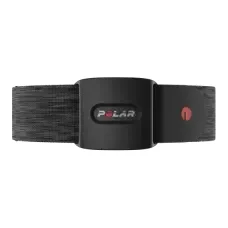
Polar Verity SenseOptical armband 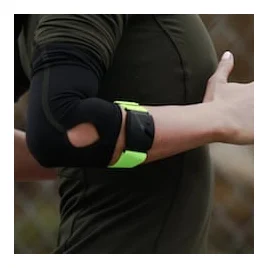
Scosche RHYTHM 24Optical armband 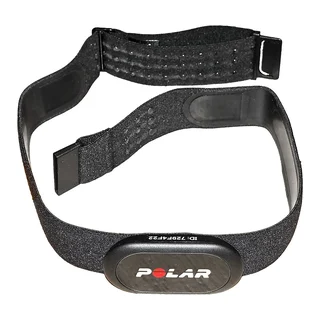
Polar H10Chest strap 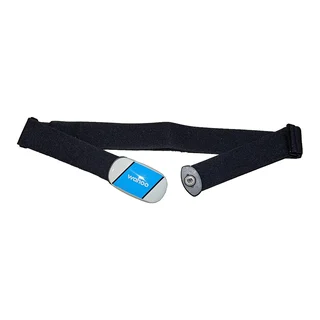
Wahoo TICKRChest strap 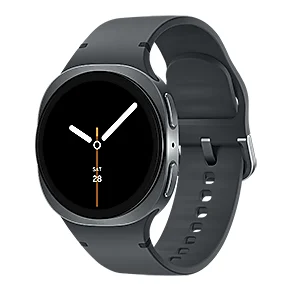
Samsung Galaxy Watch8Smartwatch


Photos: Polar H10 and Wahoo TICKR by Tiia Monto (Wikimedia Commons, CC BY-SA 3.0 and 4.0, cropped); other images are manufacturer product photos. Photos of the MindLink and BrinaLink EEG headbands are coming soon.
| Type | Device | Connection | Notes |
|---|---|---|---|
| Chest strap | Polar H10, H9, Wahoo TICKR and other standard Bluetooth heart rate straps | Bluetooth Low Energy (BLE) | Must send heartbeat interval data |
| Optical armband | Polar Verity Sense | Polar's official SDK | Data starts arriving about 25 seconds after connecting |
| Optical armband | Scosche RHYTHM 24 | Bluetooth Low Energy (BLE) | Switch it to HRV mode in the Scosche app first, then close that app |
| Smartwatch | Samsung Galaxy Watch 8 | A watch app sends the heartbeat intervals | Requires the watch app |
| EEG headband | MindLink | Bluetooth Classic | Android; paired automatically in the app |
| EEG headband | BrinaLink | Bluetooth Low Energy (BLE) | Pick it straight from the list |
Phone health data: on Android, the app can read sleep, heart rate, HRV and other records through Health Connect to view alongside your sessions, and the data stays on the phone.
Data and privacy
- Straight away
- Open the app and use it. Records are stored on this phone.
- After signing in
- Sign in with Google or Apple. The app uploads each session's summary statistics, trophies and Autonomic Age for your web personal report and for the organization's anonymized statistics.
- Backup
- A backup is saved automatically at the end of each session and included in the phone's system backup to Google Drive or iCloud. You can also export and restore manually.
- Deletion
- You can delete a single record (on the phone only), clear all local data, or delete your account in the app. When you delete your account, your ID on the server is replaced with a random ID unlinked from you.
- Birth date and sex
- Only the month and year of birth are collected, for comparison with reference norms.
See the App Privacy Policy and account deletion instructions.
Platforms
- Android 13 or later
- iOS 15 or later
- Store name: Bio Mandala Hub
Languages
Voice guidance: the narration in the 3D scenes is currently in Mandarin (Traditional Chinese). English and Japanese versions are in production, with more languages to follow.
App and web interface: 繁體中文, English, 日本語, 한국어, Filipino, Bahasa Indonesia, 简体中文, Français, Español, Deutsch, Português, Italiano, Türkçe, العربية, Русский, Українська, Polski, ไทย and Nederlands, 19 in all, so you can use the app and read your reports. The app can follow your phone's system language, or you can switch manually.

Try a group session first
Complete a session with the 3D scenes in a group relaxation room, and the report comes back to your phone.